
Lead Author
Institution
Published
Abstract
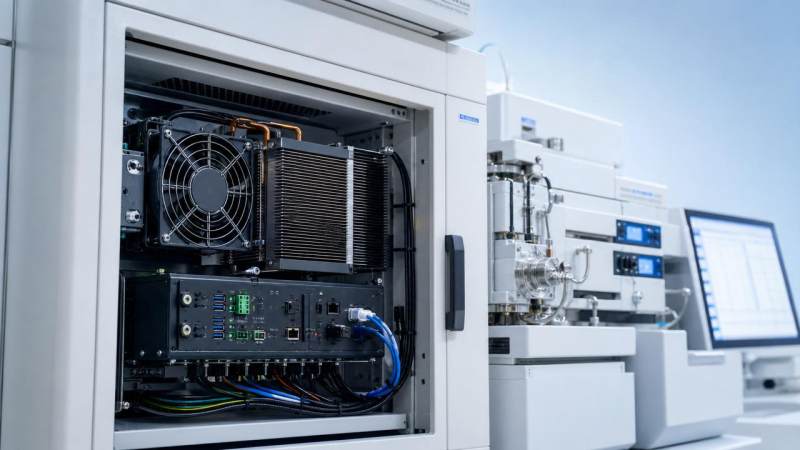
For after-sales maintenance teams, uptime often depends on what happens inside the enclosure. Effective industrial pc thermal management helps prevent overheating, unstable performance, and premature component failure in critical medical and life science environments. Understanding how heat affects system reliability is essential for reducing service interruptions, extending equipment life, and supporting compliance-driven operations where precision and continuous availability matter most.
In hospitals, laboratories, imaging rooms, and regulated production areas, industrial PCs often operate for 12 to 24 hours per day. They may support analyzers, imaging interfaces, data logging, automation control, or environmental monitoring. When thermal control is weak, the result is rarely limited to a single alarm. It can trigger processor throttling, storage errors, fan wear, display instability, and unplanned maintenance calls.
For maintenance personnel, the issue is practical: every 5°C to 10°C rise above the intended operating range can increase stress on semiconductors, power modules, and SSDs. In medical and life science settings, even a short interruption of 15 to 30 minutes may affect scheduled diagnostics, sample throughput, or documentation continuity. That is why industrial pc thermal management is not only a hardware topic, but an uptime strategy.
Why thermal control directly affects uptime in medical and life science systems
Industrial PCs in this sector are rarely installed in ideal office conditions. They may sit inside sealed cabinets, under laboratory benches, beside imaging subsystems, or near sterilization support equipment. Ambient temperatures can range from 20°C to 35°C in normal areas, and localized hot spots inside enclosures can run 8°C to 18°C higher than room temperature.
That difference matters because internal heat does not affect all components equally. CPUs and GPUs may protect themselves through throttling, but SSDs, power supplies, memory modules, and interface boards can degrade more quietly. The maintenance team often sees symptoms first as intermittent faults rather than a clear overheating alert.
Common failure mechanisms linked to heat
Thermal stress accelerates material aging, reduces capacitor life, dries lubricants in fans, and increases board-level expansion and contraction cycles. In a system operating continuously, this can turn a stable 3-year service interval into a much shorter maintenance cycle if airflow is poor or dust loading is high.
- CPU throttling that slows image processing or instrument response during peak load
- SSD temperature spikes above 70°C that increase error risk and shorten endurance
- Power supply inefficiency that creates additional internal heat under sustained operation
- Fan failure caused by contamination, bearing wear, or restricted intake paths
- Connector and solder joint fatigue from repeated heat cycling over months or years
Why regulated environments are less tolerant of thermal instability
In healthcare and life science applications, thermal faults have downstream consequences. A reboot on a packaging line is inconvenient. A reboot during image acquisition, assay processing, or environmental data capture can affect record integrity, operator workflow, and deviation handling. Where systems are aligned with ISO 13485, FDA, or CE MDR expectations, maintenance records must show that recurring heat issues are identified, investigated, and controlled.
This is where industrial pc thermal management becomes part of service quality. It supports predictable maintenance windows, lowers emergency callouts, and helps preserve validated performance conditions over time.
Key thermal risk points after-sales teams should inspect first
A fast inspection routine can reduce troubleshooting time significantly. In many field cases, the root cause is not the processor itself, but airflow restriction, enclosure design, or heat accumulation around adjacent equipment. A 6-point thermal review is often enough to identify whether the issue is component-based, environmental, or installation-related.
6 checkpoints for on-site diagnosis
- Measure ambient temperature near the intake side, not only room temperature.
- Check internal dust loading on filters, fan blades, and heat sinks.
- Review CPU, motherboard, and SSD temperatures under idle and peak conditions.
- Inspect cable routing that may block front-to-back or side-to-side airflow.
- Assess enclosure clearance; less than 50 mm around vents is often inadequate.
- Verify whether the thermal load changed after upgrades such as RAM, storage, or add-in cards.
The table below helps maintenance teams connect observable symptoms to likely thermal causes and practical first actions. It is especially useful for systems supporting diagnostics, IVD workflows, and hospital infrastructure interfaces.
A structured symptom-to-cause approach shortens diagnosis and prevents unnecessary part swaps. For after-sales teams, this reduces repeat visits and improves first-time fix rates, especially where access windows are limited to 30 to 60 minutes between clinical or lab shifts.
Environmental factors often missed during service visits
Thermal problems are often amplified by the surrounding installation rather than the PC alone. A fan-cooled unit that performs normally on a bench may fail earlier when installed beside a UPS, switch, analyzer power module, or other heat-generating device. In compact cabinets, cumulative heat rise can exceed 10°C even when each individual device is within its own specification.
Maintenance staff should also review cleaning practices. In laboratory and hospital settings, enclosure surfaces may be disinfected regularly, but intake filters and internal airflow paths may be ignored for 6 to 12 months. That imbalance creates hidden thermal risk while giving a false impression of cleanliness.
Choosing the right industrial pc thermal management strategy
Not every environment needs the same cooling architecture. The right approach depends on duty cycle, contamination level, enclosure design, maintenance access, and tolerance for moving parts. For medical and life science equipment support, the objective is usually not maximum cooling alone, but stable temperature control with predictable maintenance requirements.
Fan-cooled, fanless, and hybrid options
Fan-cooled systems can manage higher thermal loads and are common in image processing, automation control, and data-heavy applications. Fanless systems reduce particle intake and can be better suited to low-to-moderate loads in cleaner zones. Hybrid designs, including heat-pipe and directed airflow layouts, are often selected when workloads fluctuate and enclosure access is restricted.
The comparison below can support service teams and procurement stakeholders when matching industrial pc thermal management methods to specific operating conditions.
The main conclusion is that thermal design should be evaluated at both device level and enclosure level. A well-specified PC can still experience downtime if cabinet airflow, component spacing, or intake filtration are poorly planned.
Selection criteria that matter in service-heavy environments
For after-sales operations, four selection criteria are usually more useful than headline processor performance: supported operating temperature range, thermal monitoring visibility, field-replaceable cooling parts, and ease of cleaning without full disassembly. These factors influence mean time to repair and planned maintenance labor more directly than benchmark speed.
- Operating range that realistically matches site conditions, such as 0°C to 45°C or wider where required
- BIOS or system-level thermal monitoring for CPU, board, and storage temperature visibility
- Replaceable fans, filters, or ducts that can be serviced within a standard maintenance window
- Mechanical layout that avoids cable congestion around intake and heat sink zones
How to implement a preventive thermal maintenance plan
Reactive repairs are expensive in regulated technical environments because downtime affects both operations and documentation. A preventive thermal maintenance plan gives after-sales teams a repeatable method to control risk across installed systems. In many facilities, a quarterly review is sufficient for moderate-risk devices, while high-duty systems benefit from monthly visual checks and semiannual thermal validation.
A practical 5-step workflow
- Baseline the normal thermal profile at idle and under a defined workload.
- Set alert thresholds for CPU, SSD, and board temperatures based on vendor guidance and site experience.
- Document filter cleaning, fan noise changes, and cabinet temperature drift at each visit.
- Compare current readings with the baseline every 3 to 6 months.
- Escalate when repeated deviations appear, even if the system still operates normally.
This process is valuable because many thermal failures develop gradually. A fan drawing slightly higher current, or an SSD running 6°C hotter than the previous quarter, may be the earliest warning sign. Catching that trend before a fault event helps preserve uptime and avoids emergency interventions during active clinical or laboratory schedules.
Maintenance records that support compliance and service quality
In medical technology and bioscience environments, service records should do more than confirm a visit happened. They should show what was measured, what was cleaned or replaced, and whether temperatures remained within an acceptable range. Even a simple log with date, ambient temperature, CPU peak, SSD peak, and corrective action can strengthen traceability.
For organizations using G-MLS as a technical reference point, this data-driven approach aligns with broader expectations around engineering integrity and verifiable maintenance decisions. It helps maintenance teams communicate more effectively with procurement directors, laboratory heads, and engineering managers who need defensible service rationale rather than generic statements.
Frequent mistakes that shorten industrial PC life
Even experienced teams can miss thermal issues when the system continues to function between faults. Several recurring mistakes cause avoidable wear, especially in older installations or upgraded systems where the original heat balance changed over time.
Mistakes to avoid
- Assuming room HVAC temperature represents the actual intake temperature inside the cabinet
- Replacing failed parts without reviewing root-cause heat buildup
- Adding storage or interface cards without reassessing airflow and power dissipation
- Cleaning visible surfaces while leaving filters and heat sinks untreated for more than 6 months
- Ignoring thermal logs because no hard shutdown has occurred yet
When replacement is smarter than repeated repair
If a system shows repeated heat-related faults, limited sensor visibility, or obsolete cooling components, replacement may be more cost-effective than ongoing repair. This is particularly true when the unit supports critical workflows and each service interruption requires requalification, operator rescheduling, or additional documentation effort. A replacement decision should consider at least 4 factors: downtime frequency, parts availability, maintenance labor, and thermal headroom for future load increases.
Industrial pc thermal management has a direct effect on reliability, service workload, and operational continuity in medical and life science environments. For after-sales maintenance teams, the most effective strategy combines correct cooling architecture, enclosure-level airflow control, measurable inspection points, and a preventive maintenance schedule tied to real thermal data.
When heat is managed well, systems run more predictably, service calls become more planned, and component life is extended without compromising compliance-focused operations. If you need help evaluating industrial PC thermal risk, comparing cooling approaches, or building a maintenance-ready specification for healthcare and laboratory use, contact us today to get a tailored solution or discuss technical details with a specialist.
Recommended News
Metadata & Tools
Related Research
- Immunoassay Cross-Reactivity Metrics: Calculating Percentages and Assessing BiasMaster immunoassay cross-reactivity metrics: learn to calculate percentages, assess assay bias, and evaluate clinical impact with practical examples for better-informed decisions.
- Choosing a Lab Tools Supplier: Quality Checks, Lead Times, and Warranty TermsChoose a lab tools supplier with confidence. Discover how to verify quality, confirm lead times, and compare warranty terms to avoid costly delays and protect your lab’s budget.
- Choosing Interactive Pet Toys: Matching Size, Play Style, and Safety NeedsExplore nteractivepettoys matched to your pet’s size, play style, and safety needs. Compare puzzles, treat dispensers, and moving toys to choose smarter and make playtime more rewarding.
- NGS Sequencing Cost Benchmark Report: Comparing Total Costs per SampleNGS sequencing cost benchmark report: compare total costs per accepted sample, uncover hidden expenses, and evaluate suppliers with confidence to make smarter procurement decisions.
- Diagnostic Imaging Market Outlook: Growth Opportunities in CT, MRI, and UltrasoundExplore the diagnostic imaging market outlook for CT, MRI, and ultrasound. Discover growth opportunities, technology trends, and procurement insights to guide smarter healthcare investments.